Never Hit a Wall Again: How BB's Memory & Context Management Keep Your Conversations Flowing
You’re deep into a complex project. The LLM understands your codebase, your objectives are clear, and you’re making real progress. Then suddenly: “I’ve reached my context limit. Let’s start a new conversation.”
Everything stops. You have to re-explain your project structure, re-establish context, and hope the new conversation picks up where you left off. Sound familiar?
The Hidden Cost of Forgotten Context
Every AI tool has limits. Most handle them by forcing you to start over, losing:
- Your project context - File structures, architectural decisions, coding patterns
- Your conversation flow - The natural progression of ideas and solutions
- Your team knowledge - Insights that should persist across projects and team members
- Your momentum - The cognitive load of re-establishing everything you’ve built
For complex projects—the kind that require extended collaboration with an AI—these interruptions aren’t just inconvenient. They’re project killers.
Two Features, One Breakthrough
Beyond Better solves this with two complementary features that work together:
Intelligent Memory System
BB doesn’t just remember the current conversation—it builds persistent knowledge across three levels:
Global Memories: Your personal preferences, coding style, and conventions that apply across all your projects. Tell BB once that you prefer TypeScript with strict mode, and it remembers forever.
Project Memories: Project-specific context available to all conversations. BB learns your project’s architecture, design decisions, and domain knowledge—then shares it across every conversation in that project.
Collaboration Memories: Task-specific context for individual conversations. Perfect for exploratory work or one-off experiments you don’t want to permanently save.
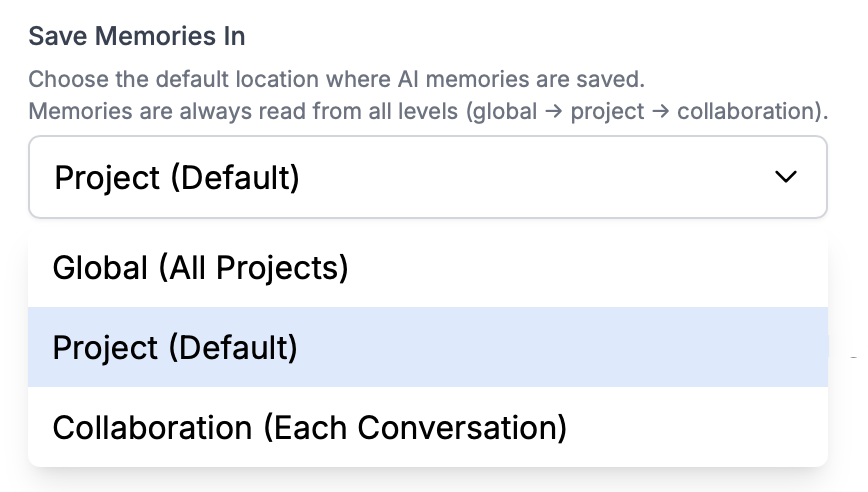
The brilliant part? You control where new memories are written, but BB always reads from all levels. This creates a rich, layered context that grows smarter with every interaction.
And it’s not just passive storage—the LLM actively manages its own memory, deciding what’s worth preserving while you maintain full control over what’s saved and shared.
Automatic Context Management
Here’s where it gets really powerful: BB monitors your conversation’s token usage in real-time. When approaching the limit, it doesn’t panic or cut you off. Instead:
- Identifies critical information - Important memories, key decisions, active project context
- Preserves what matters - Saves insights to the memory system
- Gracefully archives - Older, less relevant content makes room for new interactions
- Continues seamlessly - Your conversation flows without interruption
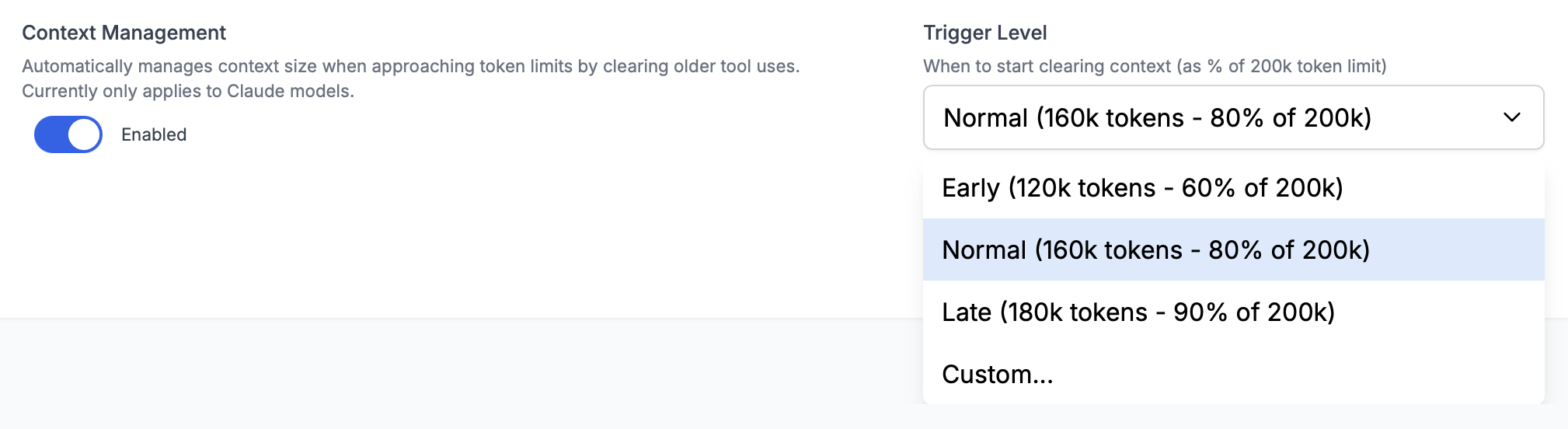
For Claude models, you get advanced control with configurable trigger levels:
- Early (120k tokens): Gives more headroom for complex operations
- Normal (160k tokens): Balanced performance—the default
- Late (180k tokens): Maximizes context before management kicks in
- Custom: Set any threshold that works for your workflow
Other LLM providers get BB’s built-in conversation summary tool—less sophisticated but still effective at keeping conversations running.
Real-World Impact
Let’s make this concrete with scenarios you’ve probably experienced:
Extended Research Sessions
Without these features: You’re analyzing 50 research papers. By paper 30, you hit the token limit. You start over and lose the connections you’d made between the first 29 papers.
With BB: The LLM remembers key findings from each paper in project memory. Context management archives older summaries while preserving critical insights. You synthesize all 50 papers in one continuous flow.
Complex Refactoring Projects
Without these features: You’re refactoring a legacy codebase across multiple modules. Each new conversation requires re-explaining the architecture, previous refactoring decisions, and coding patterns you’ve established.
With BB: Project memories capture your refactoring strategy, architectural principles, and progress. Context management keeps long implementation discussions flowing. Every conversation builds on the last, maintaining consistency across the entire refactor.
Building Institutional Knowledge
Without these features: Every team member starts from scratch. There’s no shared context, no accumulated wisdom, no learning from past projects.
With BB: Global memories capture team conventions. Project memories document your codebase’s evolution. New team members inherit this knowledge instantly. Your AI assistant gets smarter with every project.
What Makes This Different
You might be thinking: “Other tools have memory features too.” You’re right—ChatGPT added memory, and it’s useful. But here’s what sets BB apart:
Multi-Level Architecture: Not just one memory bucket, but a thoughtfully designed hierarchy that separates personal preferences, project context, and task-specific notes.
Automatic + Manual Control: The LLM manages its own memory intelligently, but you can add, modify, or remove memories anytime. Best of both worlds.
Context Management Integration: Memory and context management work together. Important insights are saved before older content is archived—nothing critical is lost.
Team Knowledge Sharing (coming soon): Project memories will be shareable across teams, building collective intelligence.
Model Agnostic: Your memories work across different LLM providers. Switch from Claude to GPT to Gemini—your knowledge persists.
How It Works in Practice
Let’s walk through a typical workflow:
First Conversation: You’re working on a new feature. BB automatically saves important decisions to project memory (your default setting).
Token Threshold Approaching: You’re 160k tokens into an intense implementation session. Context management triggers automatically.
Intelligent Preservation: BB identifies critical information—recent code changes, implementation decisions, current objectives—and preserves them.
Seamless Continuation: Older conversation history is archived, but all important context remains. Your conversation continues without interruption.
Next Conversation: When you start a new conversation tomorrow, BB loads memories from all three levels. It already knows your project, your preferences, and key decisions from yesterday.

Getting Started
Step 1: Configure Your Memory Defaults
Open Global Settings and set your default memory location. We recommend “Project” for most users—it keeps memories organized while making them accessible across all conversations in that project.
Step 2: Enable Context Management
Still in Global Settings, enable context management. For Claude models, “Normal” trigger level works well for most workflows. Other models get automatic context management without configuration needed.
Step 3: Trust the System
Start working naturally. The LLM will manage memories automatically. Context management will trigger when needed. You’ll barely notice it happening—which is exactly the point.
Step 4: Take Control When Needed
Want to override defaults for a specific project? Update project settings. Need to save something important? Explicitly tell BB. Want to experiment without saving to project? Switch to collaboration memory for that conversation.
Best Practices
Let the LLM Manage Memory: The automatic system is smart. Trust it to capture what’s important.
Use Project Memory as Your Default: It strikes the perfect balance—organized by project, accessible to all conversations.
Save Personal Preferences Globally: Your coding style, favorite tools, and conventions apply everywhere. Save them once globally.
Document Important Decisions: When you make a critical architectural choice, mention it explicitly. “Remember this decision: [explanation].” BB will save it appropriately.
Review Memories Periodically: As your project evolves, some memories become outdated. Periodic review keeps your knowledge base accurate.
Start Fresh for New Topics: While conversations can continue indefinitely, starting new conversations for distinct objectives keeps context focused and relevant.
What This Means for Your Work
Think about your most complex projects—the ones that take days or weeks of back-and-forth with an AI assistant. With these features:
- No more artificial breaks when you hit token limits
- No more repeating context in every new conversation
- No more lost insights from previous sessions
- No more starting over when switching projects
- No more isolated knowledge trapped in individual conversations
Instead, you get continuous flow. Building knowledge. Persistent context. Conversations that never truly end—they just pause until you return.
Looking Forward
This is just the beginning. We’re already working on:
Memory Management UI: Search, browse, edit, and organize your memories through a dedicated interface.
Memory Export/Import: Share memory files between projects or team members.
Team Collaboration: Built-in features for shared knowledge bases and team learning.
Enhanced Analytics: Understand what the LLM is learning and how memories are being used.
Start Building Without Limits
These features are available now in Beyond Better. No waitlist, no special access needed. Just download BB, configure your preferences, and start working the way you’ve always wanted to—without hitting walls, without losing context, without starting over.
Because the best AI conversations shouldn’t end when you hit a token limit. They should end when your work is done.
Want to dive deeper? Check out our documentation on Memory Systems and Context Management for detailed guides and advanced configuration options.
Have questions? Start a conversation with our team—we’d love to hear how you’re using these features.
Ready to try it yourself?
Start your first project free — no credit card required.